

How do I… Account and support
 Ask the AI Assistant
The AI assistant answers questions about MojoTxt right away, any time of day. It reads this user guide and, when you ask, looks things up in your own account. A person on the MojoTxt team is always one click away.
Open the assistant
- Press
 Help at the top of any page.
- Open the Ask a Question tab.
- Type your question, or pick one of the suggested questions.
- Press Send. The answer appears as it is written.
Ask follow-up questions in the same chat, and press New chat to start over. The User Guide tab takes you back to the guide. The chat stays there if you close the Help panel and open it again.
What it can answer
- How to do something in MojoTxt, with a link to the guide page that covers it.
- How many credits you have left and when your plan renews.
- Where your carrier registration stands for each number, and what is still needed from you.
- Why a message didn't reach someone. Give their name or number and it checks what happened to the messages sent to them.
- How a message went: how many were delivered and the most common reasons some were not.
- Who is on your lists, and which messages are scheduled or repeating.
It only sees what your login can see. Credit and billing answers need a login with Account Settings access.
Have it make a change
The assistant can also make small fixes for you. It always asks first: you see a card that says exactly what will change, with Allow and No thanks. Nothing changes until you press Allow.
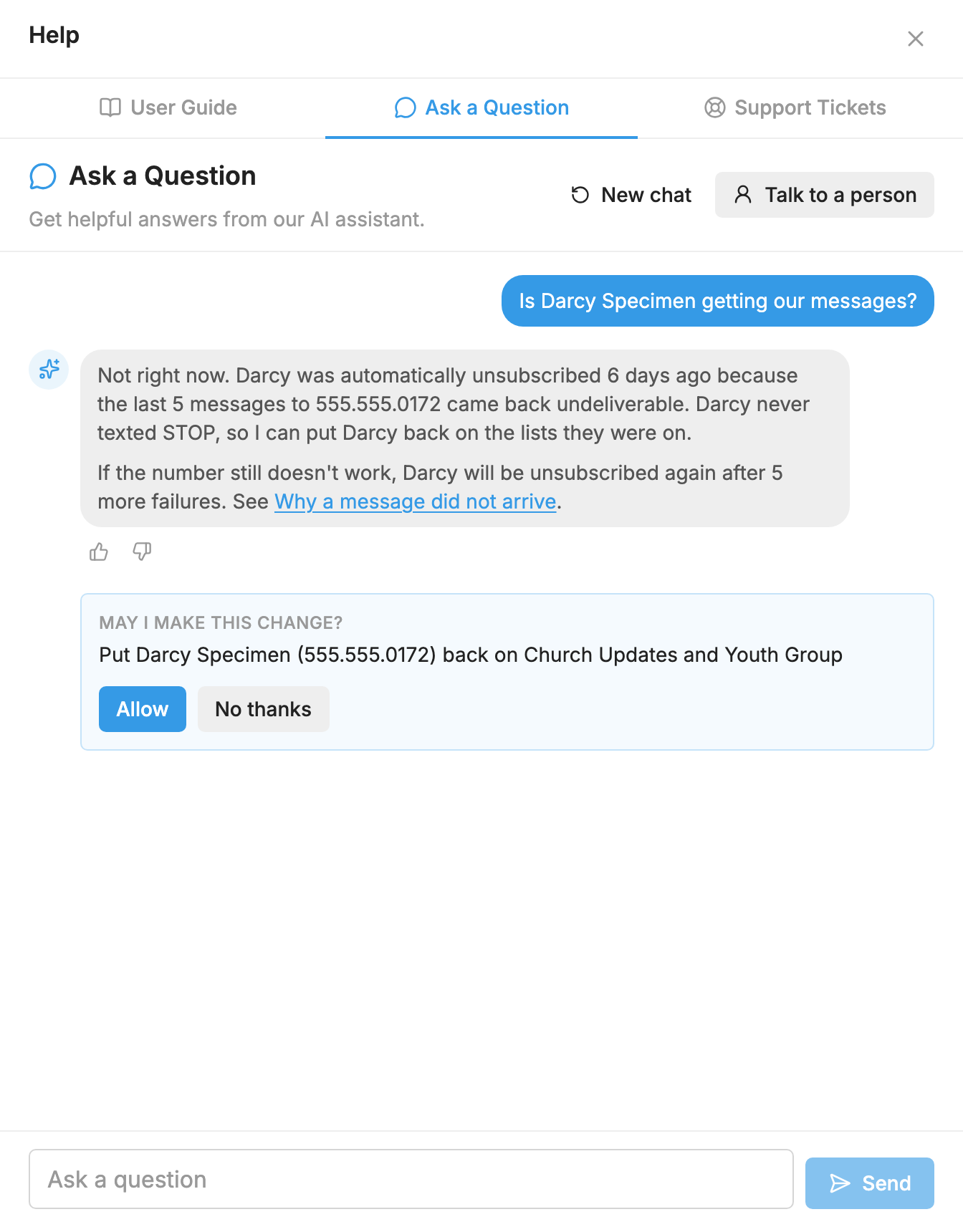
It can:
- Put someone back on their lists after they were automatically unsubscribed because messages to them kept failing.
- Resume a repeating message that paused.
- Unblock a number.
- Fix a person's first or last name.
- Turn your number's automatic unsubscribe setting on or off.
- Cancel or reschedule a message that hasn't been sent yet.
- Add someone to a list, or take them off one.
It never sends a text, never uses credits, and never changes your plan, billing or carrier registration. It can't opt someone back in after they texted STOP. Only that person can, by texting START to your number. See Opting Back In After STOP.
Talk to a person
Press Talk to a person at the top of the chat at any time. The assistant writes a short summary of your question, which you can change before you press Send. Press Attach files to add a screenshot. It goes to our support team with the whole chat attached, so you don't have to explain it again. We reply by email, usually within 1 business day. MojoTxt doesn't offer phone support. See Contact Support.
Rate an answer
Press the thumbs up or thumbs down under any answer. After a thumbs down you can add a note about what was wrong. Your ratings help us improve the assistant and this guide.
Good to know
- AI can make mistakes. If an answer doesn't look right, check the guide page it links to, or talk to a person.
- You can ask up to 50 questions a day.
- Chats are kept for 90 days so our team can see what people ask and improve the answers.
