

How do I… Lists and sign-ups
 Collect Names From Subscribers
Texting a keyword gives you a phone number and nothing else. There are two ways to get names and contact information from people who join a list: ask by text, or send them a link to their settings page.
Ask by text
- Open Subscription Lists and open the list.
- Press the
 Settings tab.
- Under Ask new subscribers for their details, check Ask for their name. You can also check Ask for their email address.
- Change the wording if you like, then press Save changes.
After the welcome message, new subscribers get your question by text, and their answer is saved to their profile. MojoTxt only asks for what it doesn't already have. Each question uses credits like any other automatic reply.
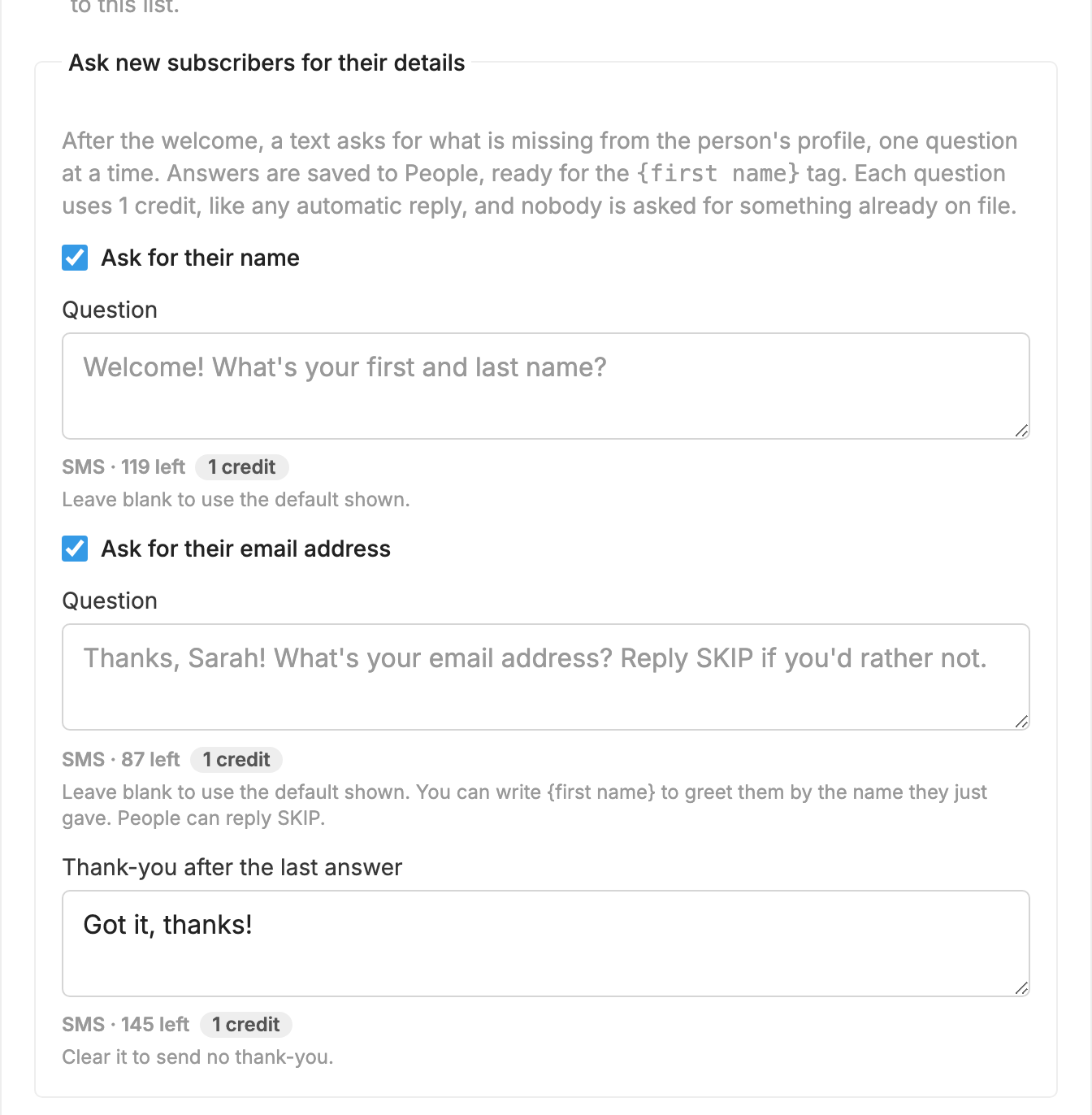
More on how the questions work is in Ask for a name or email.
Send a link to their settings page
- Open
 Automations and press New automation.
- Choose your list and press Next: write the message.
- In the Text box, type something like "Please tap here to enter your name and contact information:"
- Under Add a link (optional), choose Their profile / settings.
- Under When to send, choose Immediately after joining, or pick a later time if you would rather wait.
- Press Create automation.
When someone joins the list, they get your message with a private link to their settings page. You can add your logo and colors to that page from  Branding.
To see what people can do on that page, see Let People Manage Their Own Settings.
