

People
 Message Log
The Message Log lists every text sent from your number and every text people send to it. Use it to check whether someone got a message, find out why a message failed, or see what a person has sent you. Open the Message Log
Read the log
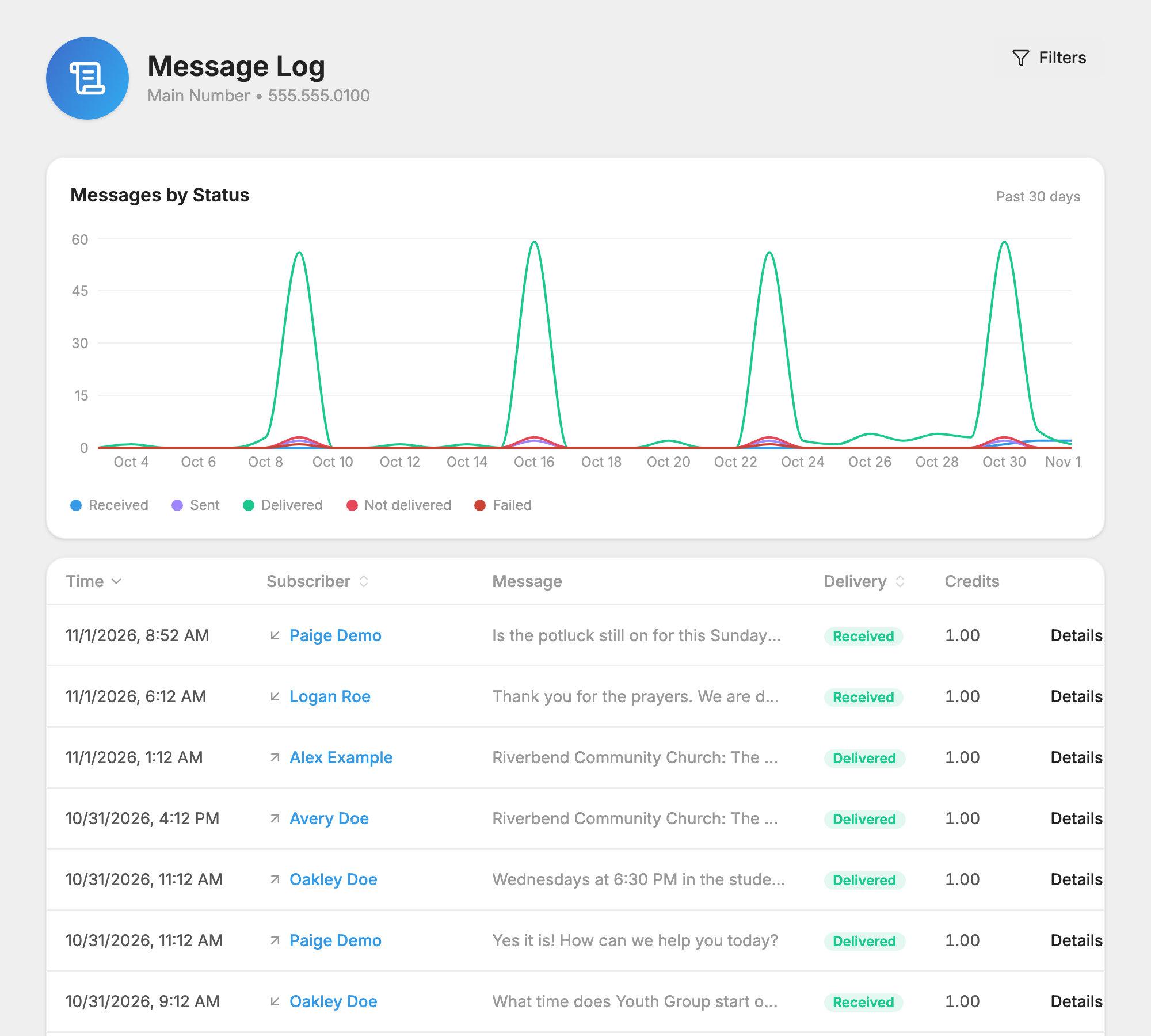
The Messages by Status chart at the top counts your messages each day, with a line for each result. It shows the past 30 days, or the dates you filter to.
Under it, the table shows the newest messages first, and more load as you scroll:
- Time: when it was sent or received, in your account's time zone.
- Subscriber: the person. An arrow shows whether the message went out or came in. Click the name to open their profile.
- Message: the start of the text. Hover over it to read the rest.
- Delivery: the result. Hover over it for a short explanation.
- Credits: what this message used.
- Details: everything about this one message.
Click Time, Subscriber or Delivery at the top of the table to sort.
Find a message
Click Filters at the top of the page. On a phone, the filters sit above the table. You can combine any of these:
- Person: one person. View Message Log on someone's profile opens the log this way.
- Direction: Outbound for texts you sent, Inbound for texts people sent you.
- Status: one delivery result.
- List: messages sent to one list.
- Keyword: one auto-responder keyword, which shows who has texted it and when.
- From and To: a date range, counted in your account's time zone.
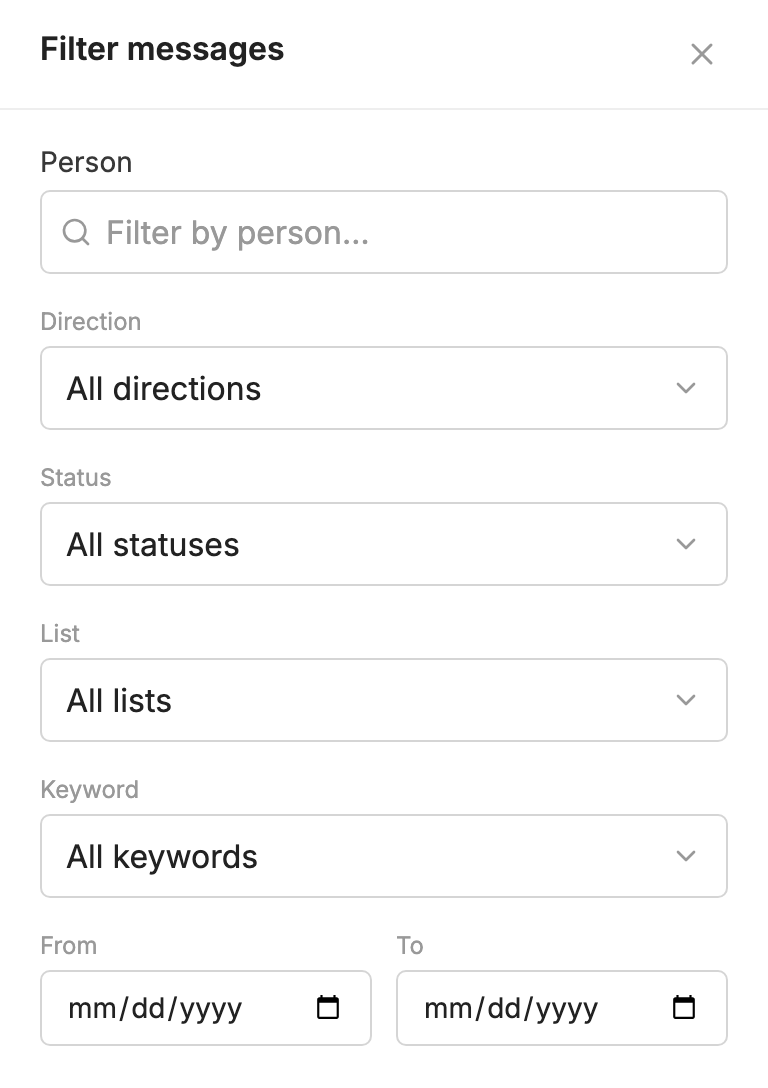
The chart and the table both follow your filters. Clear all filters starts over.
If you scroll a very long way, the log stops and asks you to narrow things down with a filter.
What each result means
- Queued: the message is waiting to be sent.
- Sending: it is being handed to the phone company.
- Sent: it reached the person's mobile carrier (their phone company), but the carrier has not confirmed delivery. Many of these did arrive.
- Delivered: the carrier says it reached the phone.
- Not Delivered: the carrier could not deliver it, or it could not be sent. Hover over the result to see why.
- Error: the message failed. If it never reached the phone company, it uses no credits.
- Received: someone texted this to you.
Carriers don't give delivery receipts for picture messages. For a picture message, Delivered means it reached the person's carrier, not that it reached their phone.
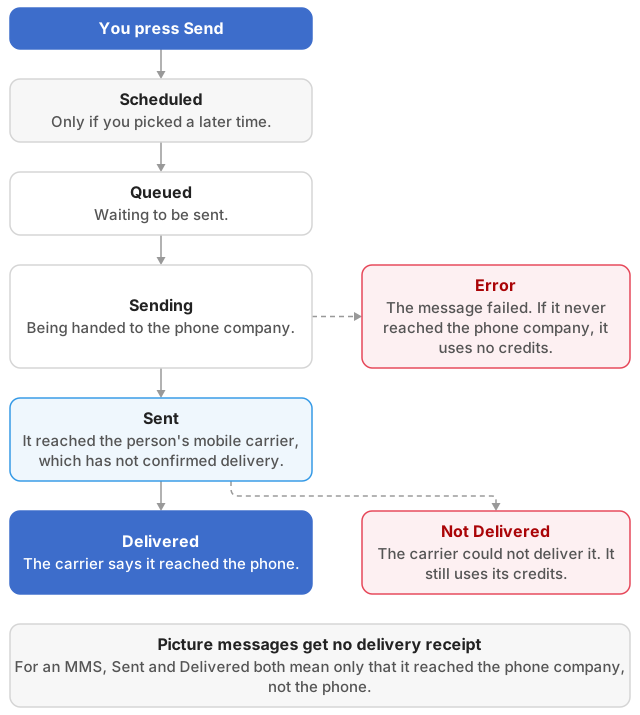
The Status filter lists Not delivered and Failed separately, but both show as Not Delivered in the table. Check both when you are looking for failures.
Why a message failed
Hover over Not Delivered, or click Details, to see the reason in plain words, with what to do about it. Common ones:
- Landline Or Non-Text Line: the number can't get texts. Ask the person for a mobile number.
- Number Deactivated or Invalid Number: the number is disconnected or wrong. Check it with the person, then use Change Phone Number… on their profile.
- Phone Unreachable: the phone may be off or out of coverage. Nothing is wrong on your end. Try again later.
- Blocked By Recipient: the person or their carrier has blocked your number. Ask them to check their phone's blocking settings.
- Recipient Opted Out: they replied STOP. See opting back in after STOP.
- Can't Receive Pictures: their phone or carrier can't take picture messages. Send them a text-only message.
- Flagged As Spam: the message was filtered. Review the wording, such as links, ALL CAPS and urgent requests for money.
Most show an error code as well. Give that code to support if you need help with it. For more, see Why a Message Did Not Reach Someone.
The Details window
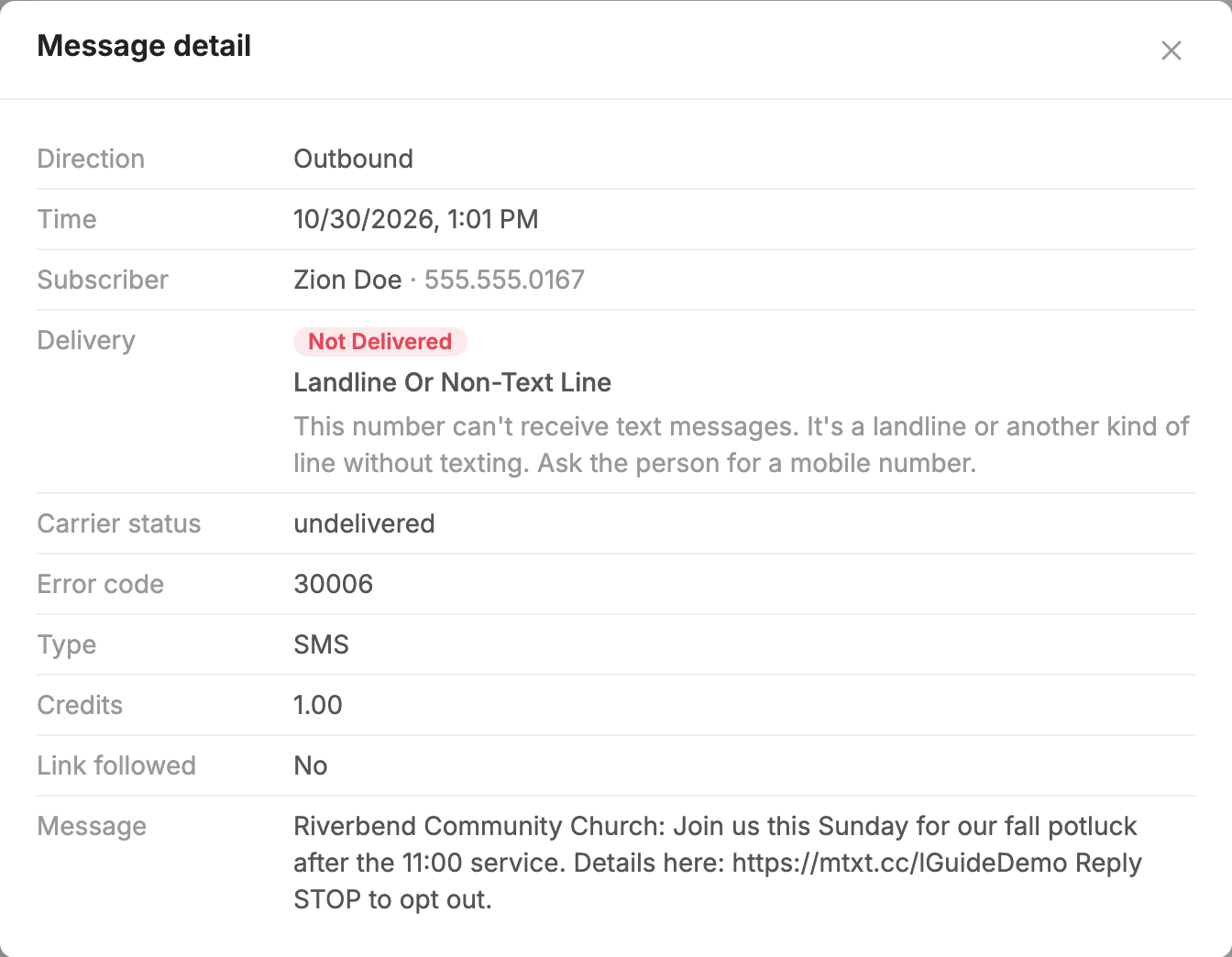
Details opens the full record of one message:
- Direction, Time and Subscriber.
- Delivery, with the explanation.
- Carrier status, Error code and Error message, when there are any.
- Type: SMS or MMS. MMS is a picture message, or a long text sent like one.
- Credits.
- Link followed: Yes or No, or N/A if the message had no link to track.
- Message, in full, and any Attachments you sent.
Pictures people send you don't show in the log. You will find them in  Conversations.
Credits in the log
- A text someone sends you uses no credits.
- A picture message someone sends you uses 1 credit.
- A message that could not be handed to the carrier shows 0 credits.
- A message the carrier accepted but could not deliver still uses its credits.
See Credits and message length.
Reports for one send
The Message Log covers your whole number. For one message or automation, its Delivery log is quicker, because it adds up the delivery rate and the links followed. See how a message did.
